
Part 1 of 3: Announcing the MARS Method: An Innovative, Data-Driven Approach for Selecting the Best Comparables
The question that looms over the market approach is “Did I select all or enough of the comparable transactions that my subject company might be similar to in this database?” Obviously, if the answer is no, the credibility of the analysis will wane. Selecting the right comparable sales transactions is fundamental to the market approach to business valuation. With the vast amount of data now available, valuation experts need more tools to help them navigate all the information available to find the most suitable comps.
Our new MARS method (Multi-Attribute Ranked Search) is one such tool. It represents a new way to wield multi-attribute utility theory to find the most relevant comps for each engagement among the mountains of data. It assists valuators by ranking potential comparables for similarity based on multiple attributes that are evaluated simultaneously.
Importantly, although MARS was designed for ValuSource Market Comps, the underlying scoring logic can be replicated in Excel. Regardless of where your comparable transaction data comes from, you can apply the same multi-attribute, score-then-rank process using straightforward formulas, enabling you to generate a complete MARS-style ranked list directly in Excel.
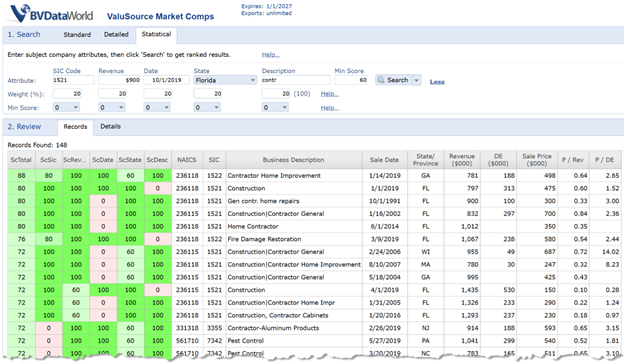
Figure 1: MARS User Interface example – The interface allows input of the five attributes and displays a ranked list of comparable sales with their scores.
MARS is intended to function as a decision-support tool — a complement to the valuator’s judgment. It brings mathematical rigor and comprehensiveness to the search for comparables, while leaving the valuator in full control of the process.
In this first installment of our three-part series on MARS, we’ll explain how MARS works together with the traditional method for choosing comps. In part two, we’ll provide a detailed example of the method at work. In the final article, we’ll address some of the skepticism valuators are likely to harbor about such a tool and outline scenarios where we believe it can help — as well as some where MARS might prove less useful.
MARS Enhances the Traditional Manual Process for Choosing Comps
Valuators typically begin by searching a transaction database applying a series of individual filters, such as industry or keyword. A number of candidate comparables is eventually selected, and the valuator decides which to use in the valuation. This approach is valid. MARS expands this approach by using more items which might be comparable, specifically, keyword, industry, size, recency, and location. Of course, each transaction might not be a perfect match, but it might match on several of the attributes. This is the essence of the MARS process.
MARS evaluates multiple attributes to find and rank comparable transactions. Rather than filtering on one criterion at a time, it simultaneously assesses five key attributes:
- Industry Classification (SIC/NAICS Code): MARS recognizes hierarchical industry codes. It gives the highest score for exact industry matches and progressively lower scores for broader industry group matches.
- Revenue (Size): It is commonly accepted that the size of a company has a lot to do with the value of a company. Revenue is used as an indication of size. The closer a company’s revenue to the subject company’s revenue, the higher the score. A company slightly larger or smaller than the subject can still score highly.
- Valuation Date: More recent sale dates receive higher scores. This reflects the assumption that economic conditions and market comparability decline the farther you go back in time.
- State (Location): An identical state match earns the highest score. Transactions in nearby or regional states may receive a moderately high score, though, reflecting that markets can be geographically related.
- Description (Business Description): If the description of a company’s products, services, or operations closely matches keywords or themes in the subject company’s description, it scores higher. By capturing keywords, transactions that might be listed in multiple industry codes will be captured. An example would be when keyword “Pool” is used. Nine different NAICS codes have been reported in ValuSource Market Comps. All are reasonable and accurate NAICS codes around pools.
For every transaction record in the database, MARS follows a structured process:
- MARS assigns a Field Score of zero to 100 to reflect how closely each attribute of a candidate matches the subject company. A score of 100 means a near-perfect match on that attribute (same industry code, very similar revenue, etc.), while zero means no meaningful match (entirely different industry or a sale date far outside the range). Scores between those figures reflect partial similarity (for example, an 80 might indicate the same industry group but not the exact same industry, or a sale date within 18 months instead of 12). These Field Scores introduce mathematical objectivity, with each attribute evaluated according to a consistent formula or rule across all records.
- MARS aggregates the Field Scores into an overall Record Score for each transaction. Record Scores also range from zero to 100 and indicate how closely all of the attributes for a transaction match the subject. A Record Score of 100 means the transaction is an extremely close match across all A score of 85 indicates strong similarity with perhaps one attribute not as close. A much lower score would indicate the transaction diverges on multiple fronts. This Record Score provides a single measure of “overall comparability,” or what we call holistic matching.
- MARS ranks all candidate transactions by Record Score. The ranking highlights the sales that are most comparable. Unlike manual sorting, which might omit some records until filters are adjusted, MARS examines and ranks every record.
- MARS filters the results with a Threshold Score. The valuator can set a “cut-off” score (for example, 80 of 100) so that only Record Scores at or above that level are returned as potential comparables.
After MARS does its part, the valuator can assess the returned comparables in closer detail and determine which to include in the analysis. But that’s not the only way the valuator is ultimately in control of the process.
Attribute Weighting and Filtering: Expert Tools for Precision
Each engagement is unique and has its own facts and circumstances. Certain attributes may be more crucial than others for defining “comparability” for a given valuation. MARS acknowledges this by allowing the expert to fine-tune the process through attribute weighting and attribute filtering options.
By default, MARS treats all five attributes as having equal weight, with each contributing 20% of the Record Score. It doesn’t prejudge which attribute is the most critical. With no single attribute driving the outcome, the comparables that result are well-rounded matches across the board, and none are selected for a single similarity.
Of course, you might believe that one or two attributes should carry more weight. For instance, if you’re valuing a restaurant, you might decide that the standard industry code isn’t as telling as the specific business description or niche (e.g., pizza restaurant). In that case, you could increase the weight of the Business Description attribute. If the business is stable and no toxic economic conditions have created ups or downs, then the valuation date may not be relevant and a decrease in the weight could be appropriate. You can even exclude an attribute altogether. While the attribute cannot be changed in MARS, the weight given the attribute can be changed.
A caveat: Weighting is powerful and should be applied conservatively. Heavily up-weighting one attribute means you’re down-weighting others, which can lead to excluding records that might offer a better overall match. In extreme cases, distortive weighting could undermine MARS’s holistic matching approach by effectively reverting to a near single-factor search.
Best practices would dictate sticking with equal 20% weights for all attributes unless you have a clear, defensible reason to deviate. In practice, many users find the default weighting already provides a robust set of comparables, and only in special cases is tinkering necessary.
Attribute filtering lets you specify a minimum required Field Score for one or more attributes. For example, you might set a filter that requires an Industry score of at least 60, meaning you only want comparables that are within the same major industry group or closer (excluding entirely different industries). Or you might say the Business Description match must be at least 80, if the qualitative business model match is absolutely critical.
By default, however, all attribute minimums in MARS are set to zero — meaning no attribute-based filtering is applied initially — to facilitate comprehensive analysis. Overly strict attribute filters can prematurely preempt transactions that are actually highly comparable in sum.
In some scenarios, a minimum bar on an attribute makes sense. Perhaps the valuation assignment explicitly requires you to consider only companies from the same state. You can set the State attribute minimum to 100 to comply with that requirement. Because different industry codes represent distinct industries, you can set a high minimum industry score when you require an exact industry match. This ensures that only observations from the same industry code are included. Essentially, attribute filters are there for deal-breakers — qualities without which you consider a transaction not comparable. Set the minimum just high enough to exclude the problematic transactions but not so high that you eliminate too many records.
Use attribute filters only when necessary to remove genuinely unsuitable comparables that slip through, applying the lowest filter that solves the issue. It’s better to manually exclude one or two outliers from the output list (using judgment) than to risk filtering out -transactions that could be helpful.
Both weighting and filtering adjustments are tools for you, the expert, to align MARS with the specific needs of your valuation scenario. MARS’s defaults are set to provide an unbiased, all-encompassing look at the data, but you have the discretion to override the defaults to enhance the relevance of results.
The MARS Advantage
Since the traditional search methods are embedded, the MARS approach to the selection of comparables yields several benefits:
- Efficiency and ease: The valuator doesn’t need to run multiple queries or repeatedly refine filters. The entire database is analyzed in a single pass to produce a ranked list. This frees up your time to focus on analyzing the top results, rather than hunting for
- Inclusion of “near misses”: Transactions will appear in the MARS results if they match well on multiple attributes but not all. MARS might score such a comparable as 85 out of 100 overall, while companies that match well on all of the attributes would score 90+.
- Consistency and objectivity: MARS applies the same objective criteria to every record impartially. Two valuators using MARS with the same inputs will arrive at the same set of scored comparables. This replication instills greater confidence in your selection of comparables and make it more credible.
Beyond MARS: The Valuator’s Second Pass
It’s important to emphasize that MARS is designed as the first pass in the comparable selection process, not the final word. Once MARS identifies and ranks potentially suitable transactions, the valuator can download the selected records into Excel or any of ValuSource’s analyzers for deeper analysis, evaluation, and selection.
Stay Tuned
Interested in hearing more? In our February 2026 issue, we’ll lay out a practical use case that demonstrates how the processes described above could play out in your practice.